What is a Utility Web Component?
What is a Utility Web Component?
Or should it be called a Functional Web Component…
I previously wrote a post about the wc-upgrader and how we can approach loading vanilla web components. This is helpful for upgrading standard elements to Custom Elements that track internal state or show some sort of UI. While I was building it though I realized there is a much better approach in some circumstances, doing the same exact thing but letting the browser do it for you.
As part of the web component suite of technologies we have the custom element spec. This spec defines two categories available to us; Autonomous and customized built-in elements. Wc-upgrader was built with autonomous elements in mind because there is no upgrading mechanism. For customized built-in elements however there is.
This brings us to a host of neat new paradigms like an easy route to progressively enhance our websites from multi-page apps to single-page apps using a component driven approach without the need for a Javascript framework or view library.
In Practice (It’s Awesome!)
My first Utility Web Component is based around how we can send data back to the server. The initial plan was laughable from a design perspective. Initially the premise was to extend the form element and have a new attribute that would provide a secondary endpoint definition. If Javascript was available, the element that would get updated and use this new address to run a fetch() call. This of course is opinionated, non-flexible, and just doesn’t give us much benefit.
While that implementation was bad, the approach was on the right track. By default (no JS) we would send data to the endpoint defined in the form’s action attribute like any other request. If Javascript is available, the constructor for the Custom Element is able to execute which means our app has access to Javascript and we can begin to make it more SPA like. When the form gets upgraded, instead of sending the data to an endpoint it will instead pass it to the specified callback function as an object and the developers code figures out what to do with it. (Perhaps sending it to a server, a gRPC call, or something like Redux.
It’s probably easiest to visualize how this manifests by seeing it in action. Below we see the default behavior on the left hand side executing. This submits the data to an HTTP endpoint (that happens to return it as json) which results in a new page loading.

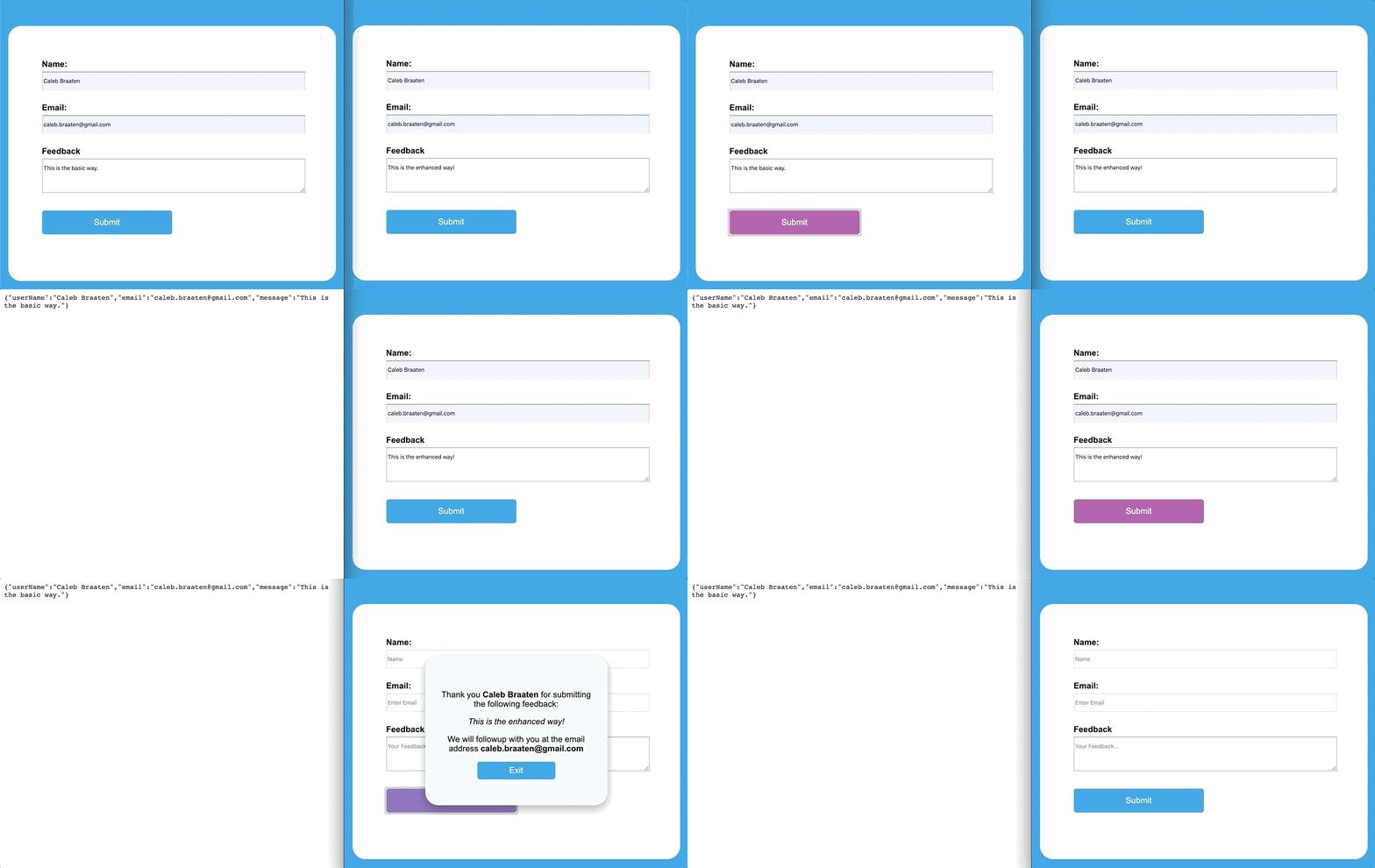
On the right hand side we see the enhanced behavior. Instead of sending the data to a server we consume it with our applications logic. In this demo we see a modal popup with the data that was submitted. Our Web Component would still work without Javascript but it gets better when Javascript is around.
Summary
So here’s the final answer. A Utility Web Component is a custom element that extends another element using the built in browser mechanisms that when loaded, changes the functionality of our application. If you want to learn more about how I implemented the demo you can check out the spa-form here.
I think Functional Web Component sounds better and your changing the function of your site but I’m concerned that it will be confused with functional programing. Let me know your thoughts. For now, I’m thinking we’ll call then Utility Web Components.